Ohio Computer Academy - IT Training & Vocational Education in Dublin, OH
All Courses
  • Free Training Courses
  • AI for Your Role
  • AI & Machine Learning
  • Cloud Tech
  • Data Science
  • DevOps
  • Dashboarding/BI
  • Database
  • WebDevelopment
  • Programming & Coding
  • MS Office & Workplace Productivity
  • QA & Test Automation
  • Professional & Career Development
  • Cyber Security

Courses

  • Computer Fundamentals for Beginners
  • MS Word for Beginners
  • Microsoft Excel for Beginners
  • Microsoft Azure for Beginners
  • AWS Cloud for Beginners
  • Oracle SQL Fundamentals
  • Tableau Fundamentals
  • Power BI Fundamentals
Explore All Programs

Courses

  • AI Essentials
  • AI for Administrative Professionals New Launch
  • AI for Managers & Team Leads
  • AI for Data Analytics & Power BI
  • AI for Software Developers
  • AI for Database & SQL Professionals
  • AI for Project Managers
  • AI for Marketing Professionals
  • AI for Sales Professionals
  • AI for HR Professionals
  • AI for Finance Professionals
  • AI for Customer Support Professionals
  • AI for QA & Test Engineers
  • AI for IT Support & System Admins
  • AI for Cybersecurity Analysts
  • AI for Job Seekers
Explore All Programs

Courses

  • Learn Claude Basics New Launch
  • Learn Claude Advanced New Launch
  • Applied Artificial Intelligence (AI) New Launch
  • AI for Workplace Productivity
  • Azure Fundamentals with AI
  • Advanced Microsoft Azure with AI
  • AI Implications for Business Strategy
  • Mastering ChatGPT & Generative AI Tools
  • Prompt Engineering
  • Agentic AI Solutions
  • AI Product Management
  • AI for Quality Control
Explore All Programs

Courses

  • AZ-900 Azure Fundamentals
  • DP-900 Azure Data Fundamentals
  • DP-100 Data Science on Azure
  • AWS Essentials
  • AWS Cloud Practitioner
  • AWS Solutions Architect
Explore All Programs

Courses

  • DP-100 Data Science on Azure
Explore All Programs

Courses

  • DevOps Essentials
  • DevOps with AWS
  • DevOps with Azure
Explore All Programs

Courses

  • Business Analytics: From Data to Insights New Launch
  • Power BI Advanced
  • Data Analytics with Excel
  • Tableau Beginner
  • Tableau Data Consumer
  • Alteryx & Tableau
  • Tableau Advanced
  • Tableau Certification prep
  • Power BI Beginner
  • Cognos Analytics
Explore All Programs

Courses

  • SQL Server for Beginners
  • SQL for Analysts
  • SQL Server Advanced
  • SQL Server T-SQL Programming
  • SSIS
  • Oracle SQL for Beginners
  • Oracle PL/SQL
  • Oracle SQL Advanced
  • Big Data with Hadoop: HDFS, MapReduce & Ecosystem Tools
  • MS Access
Explore All Programs

Courses

  • Angular Frontend Development
  • Spring 5 Framework
  • Full Stack Web Development
Explore All Programs

Courses

  • Learn Python
  • Python PCEP
  • Python PCAP
  • JavaScript & jQuery
  • Java Certification
  • Python for Data Science
  • Machine Learning with Python
Explore All Programs

Courses

  • Analyzing Data with Excel New Launch
  • Workplace Digital Skills
  • Excel Beginners to Advanced Trending Now
  • Excel for Finance
  • Excel for HR
  • Workplace Computer Skills
Explore All Programs

Courses

  • Selenium QA Automation (Java)
  • Selenium QA Automation (Python)
  • API Testing
  • QA Automation with Python (Advanced)
Explore All Programs

Courses

  • Scrum Master Certification
  • Lean Six Sigma Green Belt Certification
  • Business Analyst
Explore All Programs

Courses

  • Cyber Security Foundations for Beginners
  • Computer Networking for Cybersecurity
  • Windows & Linux Security Administration
  • Ethical Hacking & Penetration Testing
  • Artificial Intelligence (AI) in Cybersecurity
Explore All Programs
  • About Us
    • OCA Skill Sprint Method
    • Meet the Founder
  • Blogs
    • Career Building
    • AI / Machine Learning
    • MS Excel
    • Programming Essentials
    • Database
    • Cloud Computing
    • Tableau
    • Power BI
    • Web Development
    • Tips for Success
    • Qlik
    • Soft Skills
    • Technology
    • Business Intelligence Analyst
    • Message from the CEO
    • DATA ANALYST
  • TechCred
  • Find Your Training
  • Contact Us
Ohio Computer Academy - IT Training & Vocational Education in Dublin, OH


  • info@ohiocomputeracademy.com
  • +1 866-648-7284
  • Home
  • About Us
  • Blogs
    • Career Building
    • AI / Machine Learning
    • MS Excel
    • Programming Essentials
    • Database
    • Cloud Computing
    • Tableau
    • Power BI
    • Web Development
    • Tips for Success
    • Qlik
    • Soft Skills
    • Technology
    • Business Intelligence Analyst
    • Message from the CEO
    • DATA ANALYST
  • TechCred
  • Find Your Training
  • Contact Us
Find With Us
  • Home
  • Blogs
  • MS Excel
  • How to Perform Data Entry in Excel Using Forms

How to Perform Data Entry in Excel Using Forms

In Excel, data is entered into a cell, which is the intersection of a row and a column. Data entry can often be a tedious task, especially when dealing with large datasets. Fortunately, Microsoft Excel offers a powerful feature: data entry forms. In this blog, we will explore how to perform data entry in Excel using forms, making data collection easier and more efficient.

New to Excel? Watch our Free Excel for Beginners Playlist on YouTube to get started with step-by-step video tutorials.

What is a Data Entry Form?

A data entry form in Excel is a user-friendly interface that allows you to enter and manage data more easily than directly entering it into a spreadsheet. It provides a structured way to input data, ensuring consistency and reducing errors.

Why Use Data Entry Forms?

  • User-Friendly: Forms provide a clean interface for entering data, making it easier for users.

  • Error Reduction: They help minimize input errors by enforcing data types and formats.

  • Convenient Navigation: Users can easily move through fields without scrolling through a long list of data.

Enable the Form Feature in Excel

Excel does not display the Form option in the ribbon/menu by default. To enable it:

  1. Go to the File menu and select Options.

  2. In the Excel Options dialog, click on Quick Access Toolbar.

  3. From the dropdown, choose Commands Not in the Ribbon or All Commands.

  4. Scroll down and find Form. Click Add to move it to the Quick Access Toolbar.

  5. Click OK to save your changes.

This will display Form control in your Quick Access bar below the ribbon.
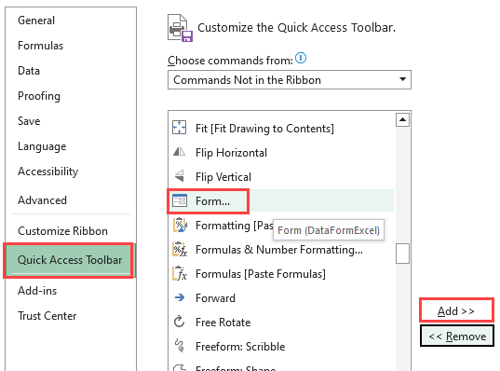
Enabling the Data Form feature in Excel using the Quick Access Toolbar.

Steps to Creating a Data Entry Form in Excel

  1. Prepare your data. Launch Excel and on a new sheet enter column headers in the first row as shown below:

  1. Select the range of cells of the column headers, navigate to Insert tab on the ribbon and select Table. Ensure the “My table has headers” option is checked as shown below:
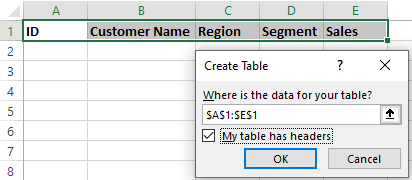
This will covert the column headers in an Excel Table.

  1. Using the form. Now, click the Form button/control in the Quick Access Toolbar. A data entry form will appear, displaying fields corresponding to your table headers. Enter the required data in the fields of the form as shown below:
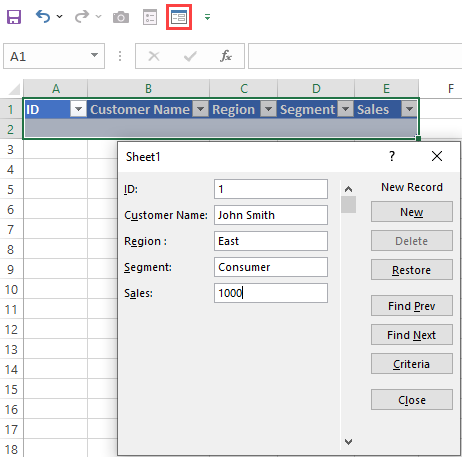
This will create the first record. if you wish to create another record, click on “New” button on the form. If you have inserted a wrong data in the form, click on Restore button to undo it.

In this way you can enter any amount of data. Repeat the process to add more records. To navigate through existing records, use the Find Prev and Find Next buttons in the form.

  1. Searching for data. You can find any data entered into the table. Selecting the range of the table and then select the Form control and click on the Criteria. It will let you enter any search criteria.

You can use a form for data entry without converting a table too, however in that case, Excel will display a warning (shown below) that it cannot determine which row in the list or selecting contains column labels/header. Just click OK to continue working with the form.
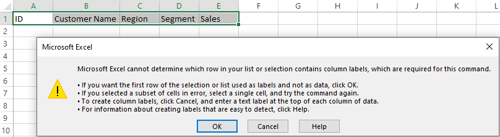
Using Excel Data Forms makes data entry faster, easier, and more organized, especially when working with large datasets. Instead of entering information directly into worksheet cells, you can use forms to add, edit, find, and delete records efficiently.

By following the steps in this tutorial, you can simplify data entry and improve your productivity in Microsoft Excel.

Related Reading

Once you've entered your data using Excel Forms, the next step is learning how to organize and analyze it.

Explore 5 Essential Microsoft Excel Skills Every Professional Should Learn to learn about sorting, filtering, and other useful Excel features.

Want to Improve Your Excel Skills?

Go beyond basic data entry with hands-on Excel training at Ohio Computer Academy. Learn Excel formulas, functions, data management, PivotTables, and more through in-person classes in Dublin, Ohio, or live online instructor-led training.

Explore Our Excel Basics to Advanced Training Course

Like
Chandraish Sinha

Chandraish Sinha is the Founder and President of Ohio Computer Academy, a leading institution committed to delivering high-quality IT education. With a passion for teaching and a belief in his company’s mission—Inspire, Educate & Evolve—Chandraish brings over 25 years of experience in the Information Technology industry.

Explore more of his work on his Amazon Author Profile.

0 Comments

Add Your Comment

Post a Comment

Required fields are marked *

✅ Thanks for adding your comment! It will appear after moderation.

0 Comments

Related Blogs
View All Blogs
Compare Two Columns in Excel with MATCH and ISNUMBER
Read More
Why MS Excel is important for an IT novice
Read More
MS Excel Practice Questions
Read More
Blog Gallery
Ohio Computer Academy - IT Training & Vocational Education in Dublin, OH

Registered with the Ohio State Board of Career Colleges and Schools — School Registration No. 2395

About Us
  • Contact Us
  • Our Story
  • Training Gallery
  • Reviews
  • Books
  • Greater Columbus Training Center
Trainings/Services
  • Course Categories
  • Learning Paths
  • Frequently Asked Questions
  • AI Advantage
Contact Us
  • Phone:+1 866-648-7284
  • E-mail: info@ohiocomputeracademy.com
  • Address:

    Dublin, Ohio
    5900 Sawmill Road, Suite # 150, Dublin, OHIO 43017 USA

Thank you
Failed
Free Training Courses
  • Computer Fundamentals for Beginners
  • MS Word for Beginners
  • Microsoft Excel for Beginners
AI Courses
  • Claude Basics
  • Claude Advanced
  • AI for Workplace Productivity
  • Prompt Engineering
  • Agentic AI Solutions
  • AI for Quality Control
Cloud Tech
  • DP-900 Azure Data Fundamentals
  • DP-100 Data Science on Azure
  • AWS Technical Essentials
  • AWS Cloud Practitioner
  • AWS Solutions Architect
DevOps
  • DevOps Essentials
  • DevOps with AWS
  • DevOps with Azure
Dashboarding/BI
  • Tableau Beginner
  • Power BI Beginner
  • Data Analytics with Excel
Database
  • Oracle SQL for Beginners
  • SQL for Analysts
  • SQL Server for Beginners
MS Office & Workplace Productivity
  • Workplace Digital Skills
  • Excel for Finance
  • Excel for HR
  • Excel Beginners to Advanced
  • Workplace Computer Skills
Learning Hub
  • Begin Your IT Career
  • Generative AI & Workplace Productivity Foundations
  • Claude AI Learning Path
  • Data Visualization Foundations
  • Data Analytics Career Path
  • AI for Business & Data Applications
  • Programming Foundations & Development Path

© 2026 Ohio Computer Academy. All rights reserved.

  • Privacy
  • Terms & Conditions