Artificial intelligence is quickly becoming part of everyday work. But using AI effectively does not necessarily mean automating an entire job or implementing a complex new system.
Often, the biggest productivity gains come from something much simpler: using AI to reduce the time spent on routine tasks.
Professionals spend a significant part of their workday writing emails, summarizing information, preparing reports, organizing notes, researching topics, and working with data. Many of these activities still require human judgment, but AI can help complete the repetitive parts faster.
The goal is not to remove people from the process. It is to let AI handle some of the routine work so professionals can spend more time reviewing, deciding, communicating, and solving problems.
If you're new to workplace AI, see our guide on How to Use AI at Work: 5 Practical Ways to Improve Workplace Productivity.
Here are seven everyday workplace tasks where AI can make a practical difference.
1. Writing and Responding to Emails
Email is one of the most common workplace activities—and one of the easiest places to begin using AI.
A short response may take only a few minutes, but those minutes add up when employees handle dozens of messages throughout the week.
AI tools can help draft:
Customer responses
Follow-up emails
Meeting confirmations
Project updates
Internal announcements
Requests for information
Professional replies to difficult messages
For example, instead of starting an email from scratch, a professional could provide AI with a few points:
Prompt
Write a professional email to a client explaining that the project will be delayed by three days because additional testing is required. Keep the message concise, take responsibility, and provide the revised completion date. |
For example:
Prompt
Rewrite this email to sound professional, friendly, and concise while keeping the original meaning. |
The value here is not simply faster writing. AI can also help professionals communicate more clearly and consistently.
2. Summarizing Meetings and Notes
Meetings often generate pages of notes, discussions, decisions, and follow-up activities.
The difficult part usually comes afterward: determining what actually matters.
AI can help transform meeting notes into organized information such as:
Key discussion points
Decisions made
Action items
Responsible team members
Deadlines
Questions requiring follow-up
Imagine a project manager has several pages of notes from a 60-minute project meeting.
Instead of manually reviewing every line, the notes could be provided to an approved AI tool with a prompt such as:
Prompt
Summarize these meeting notes. Create separate sections for key decisions, action items, responsible people, deadlines, and unresolved issues. |
The result provides a structured starting point that can be reviewed and shared with the team.
This can be particularly useful for managers, project teams, sales professionals, consultants, and anyone attending multiple meetings during the week.
However, meeting summaries should always be reviewed. AI may misunderstand context, incorrectly assign an action item, or overlook an important detail.
3. Creating Reports from Rough Information
Many workplace reports begin with information scattered across emails, notes, spreadsheets, and bullet points.
Turning that information into a professional document can take considerable time.
AI can help organize rough information into a logical first draft.
For example, suppose a manager has the following notes:
Sales increased 8% this month
Northeast region performed best
Two large orders were delayed
Customer complaints decreased
New product launch begins next month
Instead of manually turning these points into paragraphs, the manager could ask:
Prompt
Turn these notes into a concise monthly business report. Include sections for performance, key developments, challenges, and next steps. Do not add information that is not provided. |
AI can create the structure and initial wording, while the manager remains responsible for checking the facts and adding business context.
This approach can be useful for:
Status reports
Weekly updates
Project reports
Sales summaries
Management reports
Training reports
Operational updates
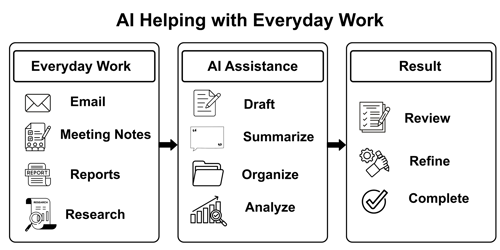
AI does not replace the knowledge required to understand the business. It helps reduce the effort involved in converting that knowledge into a readable document.
4. Turning Notes into Presentations
Creating a presentation often begins long before PowerPoint is opened.
Someone must first decide what information belongs on each slide, how the story should flow, and which points deserve emphasis.
AI can assist with this planning process.
For example, after preparing a project report, a professional could ask:
Prompt
Create an outline for an eight-slide management presentation based on this report. For each slide, provide a title, three to four key points, and a suggestion for an appropriate chart or visual. |
AI might organize the presentation into sections such as:
Executive Summary
Current Performance
Key Accomplishments
Challenges
Performance Trends
Upcoming Activities
Recommendations
Next Steps
The employee can then build the presentation using the proposed structure.
AI can also help shorten long paragraphs into presentation-friendly bullet points or suggest ways to visualize information.
The final presentation still requires human judgment. Executives, customers, employees, and technical teams may need very different levels of detail. AI can suggest the structure, but the presenter must understand the audience.
5. Researching and Organizing Information
Research is another activity where AI can save time, particularly during the early stages.
Professionals frequently need to understand:
A new industry
A business concept
A competitor
A technology
Customer requirements
Regulations
Market terminology
A topic before a meeting
Traditional research may involve opening multiple sources, reading lengthy documents, taking notes, and organizing the information manually.
AI can help create an initial framework.
For example:
Prompt
Explain the major factors a company should evaluate before adopting a new CRM system. Organize the answer into business, technical, financial, security, and user-adoption considerations. |
This provides a structured starting point for deeper research.
AI can also help compare information:
Create a comparison framework for evaluating three project management platforms. Include cost, ease of use, collaboration, reporting, integrations, security, and scalability.
However, AI-generated research should not automatically be treated as verified information.
For important business decisions, current facts, statistics, regulations, product capabilities, and quotations should be checked against reliable sources.
Think of AI as a research assistant—not the final authority.
6. Creating SOPs, Checklists, and Documentation
Many organizations have processes that employees understand but have never formally documented.
That creates problems when someone new joins the team, an employee is absent, or a process needs to be standardized.
AI can help turn informal instructions into structured documentation.
Suppose an employee provides the following basic steps:
Receive customer request
Verify account
Review request
Send to manager if approval is needed
Update customer
Close request
AI could be asked:
Prompt
Turn these steps into a professional Standard Operating Procedure. Include purpose, responsibilities, procedure, escalation requirements, and a final quality-control checklist. Do not invent company policies. |
The resulting draft can then be reviewed by the people who actually perform the process.
AI can be particularly useful for creating:
Standard Operating Procedures (SOPs)
Employee checklists
Onboarding instructions
Process documentation
Training guides
Frequently Asked Questions
Troubleshooting guides
This is an important distinction: AI can help document a process, but it should not be allowed to invent the process.
Employees and managers still need to determine what the correct procedure actually is.
7. Analyzing Spreadsheet and Business Data
AI can also assist professionals who regularly work with spreadsheets and business data.
For example, an employee might have a spreadsheet containing sales by product, region, month, and salesperson.
Instead of immediately working through the data manually, the employee could use an AI-enabled tool to help identify questions worth investigating.
AI may help with tasks such as:
Explaining formulas
Suggesting Excel formulas
Identifying possible trends
Categorizing information
Summarizing data
Suggesting PivotTable structures
Explaining unusual results
Recommending appropriate charts
Creating an initial analysis plan
For example:
Prompt
I have sales data containing Date, Region, Product, Salesperson, Units Sold, and Revenue. Suggest five useful business questions I can analyze with this data and explain which Excel feature I could use for each analysis. |
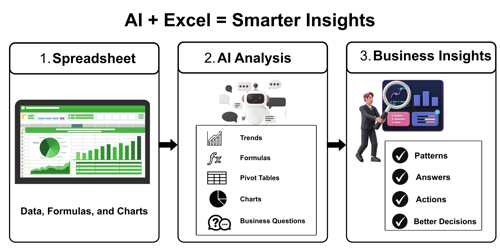
This type of interaction combines AI with traditional workplace tools rather than replacing them.
Someone who understands Excel, data analysis, and the underlying business will generally be better equipped to evaluate whether the AI's recommendations make sense.
That is why traditional digital skills remain valuable even as AI becomes more capable.
Automation Does Not Mean Removing Human Judgment
The word automation can create the impression that an employee gives a task to AI and walks away.
That is usually not the best way to use AI in professional environments.
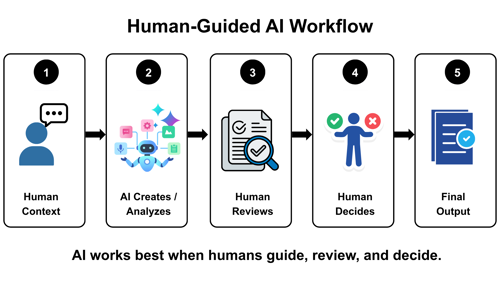
A practical workplace AI process starts with a person providing the context. AI helps create or analyze the information, the professional reviews the result, and the final decision remains with the professional.
The employee remains responsible for the final result.
Before using AI-generated content at work, ask:
Is the information accurate?
Did AI misunderstand any instructions?
Are important details missing?
Does the output fit the intended audience?
Has AI added information that was never provided?
Does the content comply with company policies?
Does the task involve confidential or sensitive information?
The ability to review AI output is becoming just as important as the ability to generate it.
Start with Small, Repetitive Tasks
Organizations do not have to automate everything at once.
A practical approach is to identify small tasks that employees perform repeatedly.
For example, consider a task that takes 15 minutes and is performed four times each week.
That is one hour every week.
If AI reduces the task to five minutes, the employee saves approximately 40 minutes per week on that activity alone.
Multiply that improvement across several recurring tasks and multiple employees, and the productivity impact can become significant.
The best starting point is often to ask:
“Which repetitive tasks consume time but still require me to review the final result?”
Those tasks are often strong candidates for AI assistance.
AI Skills Are Becoming Workplace Skills
Learning how to use AI at work is about more than knowing how to open an AI tool and type a question.
Professionals who want structured, hands-on learning can explore our AI for Workplace Productivity training.
Professionals need to learn how to:
Give AI clear instructions
Provide appropriate context
Break complex work into smaller tasks
Evaluate AI-generated information
Protect sensitive information
Recognize incorrect or fabricated answers
Improve prompts when the first result is weak
Combine AI with tools such as Excel, Word, PowerPoint, and other workplace applications
As AI becomes integrated into everyday software, these skills are likely to become increasingly valuable across many job roles.
Continue Building Practical AI Skills
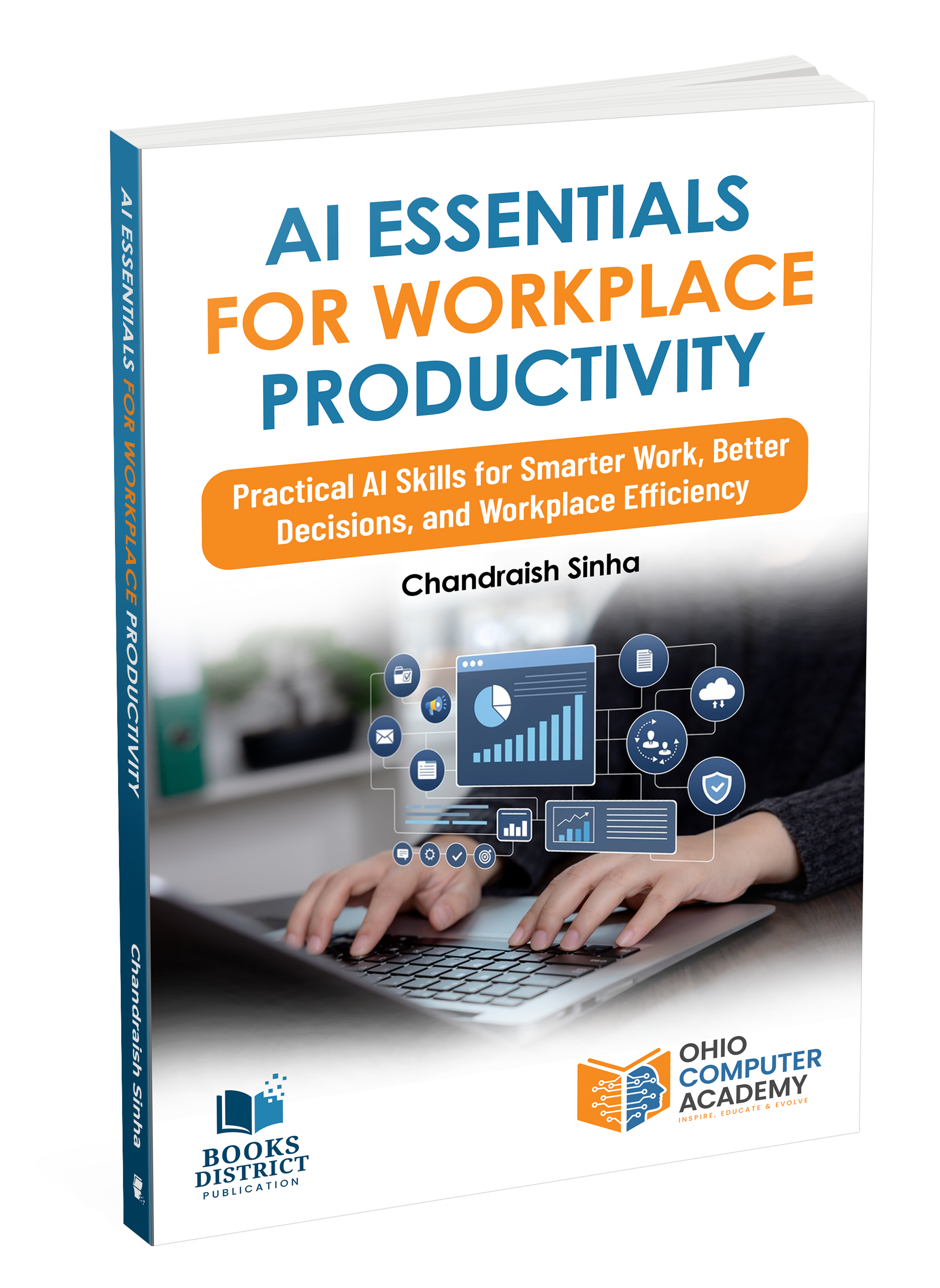
For professionals who want to explore these concepts further, AI Essentials for Workplace Productivity: Practical AI Skills for Smarter Work, Better Decisions, and Workplace Efficiency by Chandraish Sinha provides practical guidance for using AI in everyday work. The book focuses on applying AI to common workplace activities while developing the skills needed to use AI effectively and responsibly.
Learn more about AI Essentials for Workplace Productivity on Amazon.
Final Thought
AI can help automate or accelerate many everyday workplace activities, including emails, meeting summaries, reports, presentations, research, documentation, and data analysis.
The greatest value does not necessarily come from handing entire jobs over to AI.
It comes from identifying repetitive parts of everyday work where AI can provide a useful first draft, summary, analysis, or structure—while people continue to provide judgment, experience, and accountability.
Start with one recurring task. Develop a reliable way to use AI for that task, review the results carefully, and then look for the next opportunity.
Small improvements repeated across the workday can lead to meaningful productivity gains.
Frequently Asked Questions
1. What workplace tasks can be automated with AI?
AI can assist with many repetitive workplace tasks, including drafting emails, summarizing meetings, preparing reports, organizing research, creating presentations, documenting processes, and analyzing business data. In most cases, AI works best as an assistant, with a person reviewing and approving the final output.
2. How can AI improve workplace productivity?
AI can improve workplace productivity by reducing the time employees spend on repetitive activities such as writing, summarizing, organizing information, and preparing first drafts. This allows professionals to spend more time on decision-making, problem-solving, communication, and other higher-value activities.
3. Can AI completely automate office work?
AI can automate or accelerate parts of many office tasks, but complete automation is not appropriate for every activity. Tasks involving business judgment, sensitive information, customer relationships, important decisions, or complex situations generally require human review and oversight.
4. Do employees need technical skills to use AI at work?
Most everyday AI tools do not require programming or advanced technical knowledge. However, employees benefit from learning how to write effective prompts, provide clear context, evaluate AI-generated responses, recognize inaccurate information, and use AI responsibly within their organization's policies.
5. Is it safe to use AI for workplace tasks?
AI can be used safely when employees follow appropriate company policies and data-security practices. Confidential business information, customer data, personal information, passwords, financial records, and other sensitive information should not be entered into public AI tools unless the organization has specifically approved their use for that type of data.

Chandraish Sinha is the Founder and President of Ohio Computer Academy, a leading institution committed to delivering high-quality IT education. With a passion for teaching and a belief in his company’s mission—Inspire, Educate & Evolve—Chandraish brings over 25 years of experience in the Information Technology industry.
Explore more of his work on his Amazon Author Profile.
0 Comments
0 Comments


Post a Comment