
Data is numbers, text or images. Data is raw and has no meaning. Data is processed by humans and machine to drive information. Data is processed, organized, structured to provide meaningful Information.
Data should be contextual and have meaning to the user.
In IT, Data and Information is used interchangeably.
A database is an organized collection of structured information, or data, typically stored electronically in a computer system. A database is usually controlled by a database management system (DBMS). Together, the data and the DBMS, along with the applications that are associated with them, are referred to as a database system, often shortened to just database.
In database data is stored in tables.
An excel application can also be used to store and manipulate data.
Excel can accommodate limited amount of data.
In Excel Data is stored in a cell.
Data maintenance is difficult in excel
Accidental changes
Less security
RDBMS stands for Relational Database Management System. RDBMS is the basis for SQL, and for all modern database systems like MS SQL Server, IBM DB2, Oracle, MySQL, and Microsoft Access.
A Relational database management system (RDBMS) is a database management system (DBMS) that is based on the relational model as developed by E. F. Codd.
Check out this article for the 12 Codd rules of RDBMS
Data is stored in tables and is organized in terms of rows and columns. There can be multiple related tables.
The position of a row in a table is of no importance
The intersection of a row and column must give a single value
All values appearing in the columns are derived from the underlying domain
Doesn’t require users to understand its physical representation
Rows must be unique
Column names must be unique and should contain the same value.
Table and columns can have one or more constraints
Supports Null values
The data in a RDBMS is stored in database objects which are called as tables. A table is a collection of related data entries and it consists of columns and rows. These columns and rows contain fields.
A table is used for data storage in a relational database. The following is an example of an Employee table −
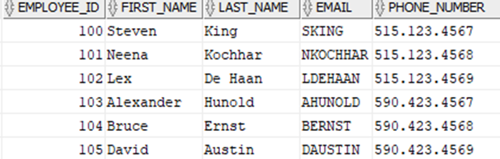
Every table is broken up into smaller entities called fields. The fields in the Employees table consist of EMPLOYEE_ID, FIRST_NAME, LAST_NAME, EMAIL, and PHONE_NUMER.
A field is a column in a table that is designed to maintain specific information about every record in the table.
A record is also called as a row of data is made up of fields. For example, there are 6 records in the above EMPLOYEES table. Record or row is always horizontal and it contains a specific information regarding the table. Following is a single row of data or record in this table with 5 fields–

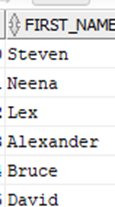
A column is a vertical entity in a table that contains all information associated with a specific field in a table.
For example, a column in the EMPLOYEES table is FIRST_NAME, which represents NAME of the specific employee. It is as shown below −
Constraints are the rules enforced on data columns on a table. These are used to limit the type of data that can go into a table. This ensures the accuracy and reliability of the data in the database.
Constraints can either be column level or table level. Column level constraints are applied only to one column whereas, table level constraints are applied to the entire table.
Following are some of the most commonly used constraints available in SQL −
NOT NULL Constraint − Ensures that a column cannot have a NULL value.
DEFAULT Constraint − Provides a default value for a column when none is specified.
UNIQUE Constraint − Ensures that all the values in a column are different.
PRIMARY Key − Uniquely identifies each row/record in a database table.
FOREIGN Key − Uniquely identifies a row/record in any another database table.
CHECK Constraint − The CHECK constraint ensures that all values in a column satisfy certain conditions.
INDEX − Used to create and retrieve data from the database very quickly.
The following categories of data integrity exist with each RDBMS −
Entity Integrity − There are no duplicate rows in a table.
Domain Integrity − Enforces valid entries for a given column by restricting the type, the format, or the range of values.
Referential integrity − Rows cannot be deleted, which are used by other records.
User-Defined Integrity − Enforces some specific business rules that do not fall into entity, domain or referential integrity.
A KEY is a value of a column/field used to identify a record in a table uniquely. A KEY could be a single column or combination of multiple columns
Note: Columns in a table that are NOT used to identify a record uniquely are called non-key columns.
A primary key is a single column value used to identify a database record uniquely. It has following attributes
A primary key cannot be NULL
A primary key value must be unique
The primary key values should rarely be changed
The primary key must be given a value when a new record is inserted.
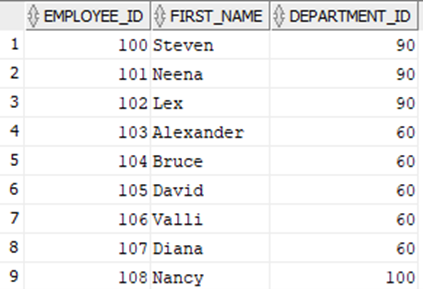
Table1
In the Table1 Employee ID is a Primary key because it uniquely identifies a record. Notice the other key field in the above table, Department_ID, this key is called the Foreign key.
Foreign Key references the primary key of another Table. It helps connect two Tables
A foreign key can have a different name from its primary key
It ensures rows in one table have corresponding rows in another Unlike the Primary key, they do not have to be unique. Most often they aren't Foreign keys can be null even though primary keys can not
Foreign key can only have values present in the PrimaryKey. In the above Table1, Department_ID is the foreign key of Primary key present in the Departments Table/Table2.
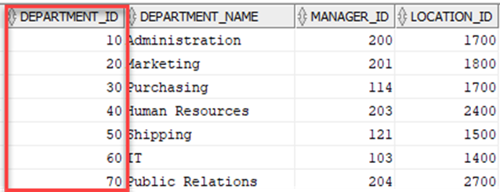
The two tables are in relation with the help of Primary and Foreign keys and hence the name Relational database.
Database maintains data integrity with the help of keys. An employee cannot work in a department which does not exists or which is not present in the Departments table.
The design process of the database will have the following steps:
Analyze the requirements and purpose of the database. What are the user views of the data (present and future)?
Define the Problems and constraints.
Identify the business rules
Source of the data
Define the scope of the database system
Conceptional design of the database. The purpose of the conceptual design phase is to build a conceptual model based upon the previously identified requirements, but closer to the final physical model. A commonly-used conceptual model is called an entity-relationship model (diagram below).
Identify the entities and attributes.
An entity is any object, place, person, concept, activity about which an enterprise records data. E.g. Employee, Department, Salary etc.
Attributes are data elements that describe an entity. E.g. Employee – Name, email etc.
Create relationships. Entities have association of relationship between them. It is represented by a diamond in the E-R diagram. E.g. there are two entities Student and Course. The relationship can be – A student <enrolls> in a course.
An Entity Relationship diagram, also called as ERD or ER-diagram.
Shows the relationships of entity sets stored in a database.
An entity in this context is an object, a component of data. An entity set is a collection of similar entities.
These entities can have attributes that define its properties.
By defining the entities, their attributes, and showing the relationships between them, an ER diagram illustrates the logical structure of databases.
ER diagrams are used to sketch out the design of a database.
Name | Symbol | Function |
Entity |
| Unique Data object/table in the system |
Attribute | Describes the entity | |
Relationship |
| Relates two entities |
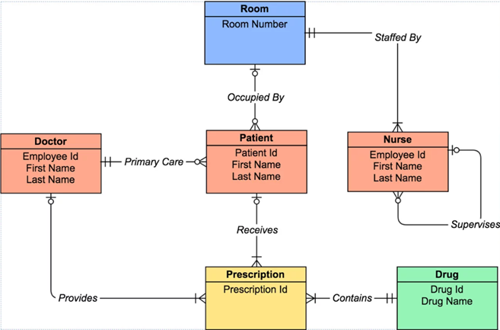
The relationship or degree of relationship indicates the link between two entities for a specified occurrence of each. It is also called cardinality.
There are 3 types of relationships or cardinality:
One to one (1:1)
One to Many (1:N)
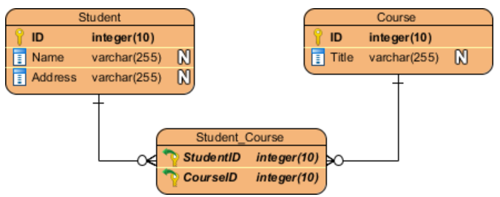
Many to Many (M:N)
A user can have a single profile.
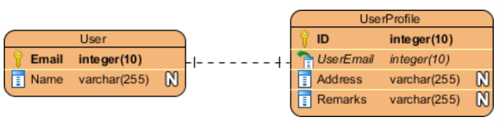
A Department can have many students but many students can be in one department.

A student can enroll into many courses. A course can have many students. Note in the relationship, there is a table (Student_Course) in between which has one-many relationships with Student and Course tables. In Many-to-Many relationships there will always be a third table in between.
Logical/physical design. Once the conceptual design is complete, you will move on to Logical or physical design.
Previously defined Entities will become tables and attributes will become the fields.
Keys will be created
Other constraints will be applied
Implementation
Install database management system
Create database and tables
Load data
Setup users and security
A database schema is a collection of logical data structures, or schema objects. A database schema is owned by a database user and has the same name as the user name. Schema objects are user-created structures that directly refer to the data in the database. The database supports many types of schema objects, the most important of which are tables and indexes.
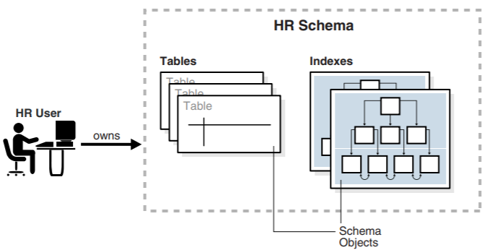
All Oracle databases include default administrative accounts. Administrative accounts are highly privileged and are intended only for DBAs authorized to perform tasks such as starting and stopping the database, managing memory and storage, creating and managing database users, and so on.
The administrative account SYS is automatically created when a database is created.
This account can perform all database administrative functions.
The SYS schema stores the base tables and views for the data dictionary.
These base tables and views are critical for the operation of Oracle Database. Tables in the SYS schema are manipulated only by the database and must never be modified by any user.
The SYSTEM account is also automatically created when a database is created. The SYSTEM schema stores additional tables and views that display administrative information, and internal tables and views used by various Oracle Database options and tools. Never use the SYSTEM schema to store tables of interest to non-administrative users.
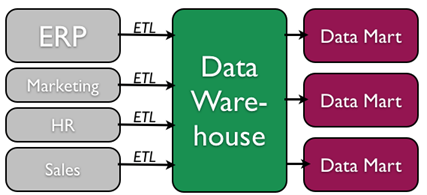
In a Data warehouse, data is extracted from one or more of the Operational databases for storage and analysis purposes.
Data warehouse contains the entire data of the enterprise and Datamart is business specific database such as Sales, HR etc.
Data mining is the process of analyzing data to find previously unknown trends, patterns, and associations in order to make decisions. Generally, data mining is accomplished through automated means against extremely large data sets, such as a data warehouse. Some examples of data mining include:
An analysis of sales from a large grocery chain might determine that milk is purchased more frequently the day after it rains in cities with a population of less than 50,000.
A bank may find that loan applicants whose bank accounts show particular deposit and withdrawal patterns are not good credit risks.
A baseball team may find that collegiate baseball players with specific statistics in hitting, pitching, and fielding make for more successful major league players.
Structured Query Language (SQL) also called SEQUEL, is the set of statements with which all programs and users access data in an Oracle database. Application programs and Oracle tools often allow users access to the database without using SQL directly, but these applications in turn must use SQL when executing the user's request.
It was developed by Dr. E. F. Codd. SQL is accepted as the standard RDBMS language.
What are the 12 Codd rules for RDBMS?
SQL provides statements for a variety of tasks, including:
SQL unifies all of the preceding tasks in one consistent language.
SQL is made of three sub-languages such as:
Data Manipulation Language (DML): Used for query, insertion, deletion and updation of data stored in the databases.
Data Definition Language (DDL): Commands to create objects such as tables and views.
Data Control Language (DCL): Used for controlling data and access to the database.
To follow this course with hands-on practice, you need to install Oracle.
To run query’s, you also need to install, SQL developer. Google and download the installation files.
Each column value and constant in a SQL statement has a data type, which is associated with a specific storage format, constraints, and a valid range of values.
When a table is created, a data type is specified for each of its columns. Oracle provides the following built-in data types.
DataType | Description |
CHAR (size) | Fixed-length character data of length size bytes. |
VARCHAR2 (size) | Variable-length character data. |
NCHAR(size) | Fixed-length character data of length size characters or bytes, depending on the national character set. |
NVARCHAR2 (size) | Variable-length character data depending on national character set. |
CLOB | Stands for character large objects, used to store string data too large to be stored in a VARCHAR column |
NCLOB | Single-byte or fixed-length multibyte national character set (NCHAR) data. |
LONG | Variable-length character data. |
NUMBER (p, s) | Variable-length numeric data. Maximum precision p and/or scale s is 38. |
DATE | Fixed-length date and time data, ranging from Jan. 1, 4712 B.C.E. to Dec. 31, 4712 C.E. |
BLOB | BLOB stands for binary large objects, which are used for storing binary data, such as an image. |
BFILE | Used to store a locator (link) to an external binary file (file stored outside of the database). |
RAW (size) | Used to store binary data, (for example, graphics or audio files). It can only be queried or inserted; RAW data cannot be manipulated. |
LONG RAW | Variable-length raw binary data. |
ROWID | Binary data representing row addresses. |
Query’s are written using SQL Developer. To write a query, invoke SQL Developer and connect to the appropriate scheme or database. (Sometimes these terms are used interchangeably)
To connect to a database or schema you will need the appropriate user id and password.
*The queries in this section follows Scott/tiger sample database. Scott is the database user name and tiger is the password.
A query, or SQL SELECT statement, selects data from one or more tables or views. A query always starts with a Select statement.
A query will always have a SELECT statement.
The simplest form of query has this syntax:
SELECT <Column1, Column2,.. Column n> FROM <Table name1, Table name2..Table name n>;A SELECT statement can be extended to include other statements or clauses,
SELECT <Column-list> FROM <table-name>WHERE <condition>GROUP BY <column-name(s)>HAVING <condition>ORDER BY <expression>;The columns/fields from which the data is to be selected, and the Table name specifies the tables or views that have these columns.
Tip: Semicolon (;) at the end, specifies end of the statement. Also check the spelling of the Column names and table names. They should be spelled exactly as in your database table.
To check the columns in your table, use desc <tablename> or collapse your table in SQL developer.
SQL statements are not case sensitive.
SQL statements can be on one or more lines.
Keywords cannot be abbreviated or split across lines.
Clauses are usually placed on separate lines.
Indents are used to enhance readability.
Ques. Select all columns from Table EMP
Launch SQL developer. Check you are connected to Scott/tiger database.
In the SQL worksheet, type the following statement
SELECT * FROM EMP;Click Execute button
Check the results. See the number of rows fetched and time taken to fetch the results.
Ques. Select all columns from Table DEPT;
SELECT * FROM DEPT;Ques. How many rows of data is there in Table SALGRADE;
SELECT * FROM SALGRADE;Ques. How many columns are there in Bonus table and how many rows of data;
<Student should provide the answer>*You can select specific columns/fields from a table.
Ques. Select empno and ename from table EMP:
SELECT empno, enameFROM EMP ;Ques. Display DeptNo and Dname from the table Dept:
SELECT DEPTNO, DnameFROM DEPT;Ques. Display Employee names and their Salaries:
SELECT ename, SalFROM EMP;Ques. List all the department numbers, employee numbers and their Manager numbers from the EMP table.
<Student should provide the answer>Ques. List department names and locations from a table in the database.
<Student should provide the answer>When query is displayed, the default column headings in the tables are displayed. Sometimes, in real life scenarios you are may have to display these returned columns with a different or a new name.
You can do so my specifying an alias immediately after the column name. This only changes the display column name and DOES NOT change the name of the column in the table.
Ques. Select ename, Job and DeptNo from EMP table.
Display ename as Name, Job as Position and DeptNo as Department_ID
SELECT ename as Name, Job as Position, DeptNo as Department_IDFROM EMP;Tip: Check the results. All alias columns are displayed in caps. To change this use double quotes around them.
SELECT ename as "Name", Job as "Position", DeptNo as "Department_ID"FROM EMP;Tip: As is optional but a good practice. Try above query without ‘as’ and verify the results
Practice the above alias statements with other columns/tables. Try to get a space between the alias columns like “Department ID”.
When the results of a query are displayed, records or the output can be in any order, unless an order is specified using an ORDER BY clause. Default sort order of an Order BY clause is Ascending.
Ques. Select empno, ename, HireDate, Sal from Emp and sort the results by ename.
SELECT empno, ename, HireDate, SalFROM EmpORDER BY ename;Ques. Selectempno, ename, HireDate, Sal from Emp and sort the results by empno.
SELECT empno, ename, HireDate, SalFROM Emp ORDER BY empno;Ques. Selectempno, ename, HireDate, Sal from Emp and sort the results by Sal in descending Order.
SELECT empno, ename, HireDate, Sal FROM Emp ORDER BY Sal Desc; Practice: Practice the above statement with ASC and
Write above query by using number instead of ‘Sal’ in the Order By
Sometimes you get duplicate rows in your query, check by selecting Department_Id from Employees. To eliminate the duplicate rows, use Distinct Keyword.
Ques. Display the all the unique department numbers in the Employees table. (Before doing this, complete below parts- a, b)
First check if you get duplicate departments in Emp table. Answer WHY you are getting duplicates.
Check if you are getting duplicates Department numbers in Dept table. If yes then WHY. If no then WHY.
SELECT Distinct Department_IdFROM Emp;We don’t always query the tables directly for all the values, this is especially true when we are looking for a specific value or when the data in the table is huge. The Where clause can also be used as a filter to the query.
Conditions can also be implemented by using the relational and Logical operators with WHERE.
Ques. Display the details of the Employees working in Department 20.
SELECT *FROM empWHERE DeptNo = 20;Ques. Display the Employee number and Names of Employees whose job description is Manager.
SELECT empno, enameFROM empWHERE Job = 'MANAGER';Practice: In the above query, can you use Job = ‘Manager’ and check the result.
Ques. List all the Clerks in the company.
<Student should provide the answer>Operators are used inside an expression to articulate specified conditions to retrieve data.
Comparison operators compare expressions and return one of three values: TRUE, FALSE, or Unknown.
Ques. List the name and salary of the employees whose salary is more than 1000.
SELECT ename, SalFROM EmpWHERE Sal > 1000; Practice: Can you sort the above results in descending order of Salary.
Ques. Display the all the Employees where Salary greater than equal to 3000 and less than equal to 4000.
SELECT empno, ename, SalFROM EmpWHERE Sal >= 3000 and Sal <=4000; Ques. List the names of the clerks working in the department 20;
SELECT enameFROM empWHERE job = 'CLERK' and DeptNo = 20;Ques. Display the names and jobs of analysts and salesman;
SELECT ename, jobFROM empWHERE job = 'ANALYST' OR job = 'SALESMAN';Ques. List thedetails ofthe employees who have joined before the end of 30 September 81
SELECT *FROM empWHERE hiredate <= '30-SEP-81';Ques. List the names and jobs of the employees who are NOT managers.
SELECT ename,jobFROM empWHERE job <> 'MANAGER';The IN and Not In operators determine whether a value matches any values in a list or a subquery.
Ques. List the name of the employees whose employee numbers are 7369,7521,7839
SELECT empno, ename,jobFROM empWHERE empno IN(7369,7521,7839)Ques. Select all the Employees who work in Departments 10,20 and 30.
SELECT empno, ename, DeptNoFROM Emp WHERE DeptNo IN (10,20,30);Ques. Select all the Employees who work ‘Not In’ Departments 10,20 and 30.
SELECT empno, ename, DeptNoFROM Emp WHERE DeptNo NOT IN (10,20,30);Ques. Display Employee Number, Employee names and Job of employees having the Job as Clerk, SalesMan, Analyst
SELECT empno, ename, JobFROM EmpWHERE Job IN ('CLERK','SALESMAN', 'ANALYST');Ques. Display ename, Job and Salary where Salary is between 3000 and 4000.
SELECT ename, job, Sal FROM EmpWHERE SAL BETWEEN 3000 and 4000; Practice: Try the above query with NOT BETWEEN
Ques. List employee names, hiredate who have joined between 30th June 81 and after 31st December 81
SELECT ename, hiredateFROM empWHERE hiredate BETWEEN '30-Jun-81' and '31-DEC-81';The pattern match condition is useful when you need to find values that are similar to a given pattern string or when you have only a partial piece of information to use as a search criterion. % and _ are also called wild character.
e.g. String like P% is used when the word is of any length but starts with letter P.
String like %a is used when the word is of any length but ends with a letter a.
String like %n% is used when the word is of any length but ends has ‘n’ in between
String like A_ _ _ is used when the word is of four-character word, starting with a letter A
Ques. Display the all the Employees where Name starts with a letter A.
SELECT enameFROM empWHERE ename like 'A%';Ques. Display the all the Employees where name does NOT start with a letter A.
SELECT enameFROM empWHERE ename Not like 'A%';Ques. Display the all the Employees whose names ends with an S.
SELECT enameFROM empWHERE ename like 'S%';Practice: Write above query where name starts with a letter S.
Ques. Findemployees whose names have exactly 5 characters
SELECT enameFROM empWHERE ename like '_____';Ques. List the employee names have ‘I’ as the second character
SELECT enameFROM empWHERE ename like '_I%';Ques. Display Employee Name where letters A appears exactly one time.
SELECT enameFROM empWHERE ename Like '%A%' AND ename Not Like '%A%A%';Ques. Display Employee Name where Name contains A but does not starts with AL.
SELECT enameFROM EmployeesWHERE ename Like '%A%' AND ename NOT Like '%Al%';The Concatenation operator || is used to combine two columns.
Ques. Display empno concatenated with Ename and job.
SELECT empno || enameFROM Emp;Practice: Display empno and ename together with a hyphen between the two.
Null is special. It is denoting a missing information. Null is not zero, a space or an empty string.
You cannot compare it with any other values like zero (0) or an empty string (”). NULL is even not equal to NULL.
Ques. Display employee names with no commission.
SELECT enameFROM empWHERE COMM IS NULL;Ques. List thenamesof the employee/s and their job, who does not report to anybody
SELECT ename, jobFROM empWHERE mgr IS NULL;Arithmetic operators can be done on numeric columns
Alias names can be given to columns with expressions
SQL Supports the basic arithmetic operators, +, -, *, and /
Ques. List the name, salary and PF amount of all the employees. (PF is calculated as 10% of Salary)
SELECT ename, sal, sal * .1 as PFFROM emp;Ques. Display ename, Salary as Monthly Salary and Salary as annual salary of employees in department 30.
SELECT ename, sal as "Monthly Salary”, Sal * 12 as "Annual Salary"FROM empWHERE deptno = 30;An aggregate function returns a single result row, based on a group of rows in a Table.
Count returns the number of rows returned by the query. If asterisk (*) is specified, then this function returns all rows, including duplicates and nulls. COUNT never returns null.
Syntax:
Count (*[DISTINCT] All/Column name)Ques. Display the number of Employees working in the Organization.
SELECT COUNT(*) FROM emp;Ques. Count distinct Managers in the Employees table.
SELECT COUNT (Distinct MGR) "Managers" FROM emp;Ques. Display all the jobs present in emp table
SELECT job FROM emp;The Sum function returns the Sum of values of the select list of columns.
Syntax:
Sum(Distinct /ALL/Column name)Ques. List the total salaries payable to employees.
SELECT Sum(Sal)FROM emp;The AVG function returns the Average of values of column values.
Ques. Calculate the Average of all the Salaries in the emp table.
SELECT Avg(Sal)FROM emp;The GROUP BY clause is used to divide the rows in a table into smaller groups
The GROUP BY is used with the SELECT statement
SQL groups the result after it retrieves the rows from the table
Conditional retrieval of rows from a grouped result is possible with HAVING clause
ORDER BY can be used to order the final result
Syntax:
SELECT <Column-list> FROM <table-name>WHERE <condition>GROUP BY <column-name(s)>HAVING <condition>ORDER BY <expression>;Group By Clause
The GROUP BY clause is used in a SELECT statement to collect/combine data across multiple records and group the results by one or more columns.
The GROUP BY clause is used with aggregate functions such as SUM (), AVG (), COUNT (), MAX (), and MIN ().
Aggregate functions are used to return summary information for each group. The aggregate functions are applied to individual groups.
The columns or expressions that are not encapsulated within an aggregate function, must be included in the GROUP BY clause.
In the query, Group by appears after From
The syntax of Group by clause is:
SELECT <Column1, .. Column n> FROM <Table name1, Table name2..Table name n> Group By ColumnsList; Ques. List the department and number of employees working in each department.
SELECT DeptNo, Count (*) FROM emp GROUP BY DeptNo;Practice: Write the above query without GROUP BY (last line) and discuss the result.
Ques. List the department number and the total salary payable in each department
SELECT deptno, Sum(Sal) FROM emp GROUP BY deptno; Ques. Find the minimum salary in each department
SELECT deptno, MIN(Sal) AS "Lowest salary" FROM empGROUP BY deptno; Having clause is used to specify which groups are to be displayed i.e. restrict the groups that you return on the basis of aggregate functions. Having is similar to Where Clause but used to restrict the Groups.
Ques. List total salary for all the departments employing more than five people
SELECT deptno, Sum (Sal), count(empno)FROM empGROUP BY deptnoHAVING count (*) > 5;The above clauses are executed in the following order:
Restrict the individual rows using WHERE
Group the returned rows based on the GROUP BY
Restrict the Grouped rows by using the HAVING
Sort the result using the ORDER BY clause. Order By must use the aggregate function or the column in the group by clause.
A Join is used to combine columns from two or more tables based on values of the related columns.
The related columns are typically the primary key column(s) of the first table and foreign key column(s) of the second table.
The connection between the tables is established through the WHERE clause.
Types of Joins are:
Equi join
Cartesian join
Outer join
Self-join
Non-equi join
Joins
Check out the following blog about Joins in SQL:
Syntax:
SELECT table1.column1, table2.column2 FROM table1, table2WHERE table1.column1 = table2.column2Note:
Write the join condition in the WHERE clause.
Prefix the column name with table name when the same column name appears in more than one table.
When two tables are joined together using the equality of values in one or more columns, they make an equi join. The equi join or Inner join will display the matching rows in two tables.
Ques. List the employees, Employee ID, Name, Department number and the department name.
SELECT empno, ename, emp.deptno, dnameFROM emp, deptWHERE emp.deptno = dept.deptno;Note: DeptNo exists in both the tables, to avoid ambiguity, the column name should be qualified with the table name. Both table names/aliases should be specified (Emp and Dept). The WHERE clause defines the joining condition i.e. join the Emp table with the dept table based on DeptNo column. It checks for the equality of values in these columns.
Practice: Check the number of rows in the above query. Write a query to see all the departments in the department table and explain the difference in the number of rows.
It can be tedious to type the complete Table names repeatedly. Just like columns, Aliases can be used for Table names too. Using table aliases also speeds up the query.
Practice: Write the above query using the table aliases
SELECT empno, ename, DeptNo, dnameFROM emp e, dept dWHERE DeptNo = D. DeptNo;When no WHERE clause is specified, each row of one table matches every row of the other table. This results in a cartesian product.
If table 1 has 10 rows, Table 2 has 10 rows, cartesian join will give you 100 rows.
SELECT empno, ename, e.deptno, dnameFROM emp e, dept dThe emp table has 14 rows, dept table has 4. The above query will give you 14 * 4 = 56 rows.
If there are any values in one table that do not have corresponding values in the other, in an equi join that row will not be selected. Such rows can be forcefully selected by using the outer join symbol (+). The corresponding columns for that row will have Nulls.
Ques. Display the employees working in each department. Display the department information even if no employees belong to that department.
SELECT empno, ename, e. DeptNo, d.deptno dept, dnameFROM emp e, dept dWHERE e.deptno(+) = d.deptno;The above SQL will display the department details with NULL for Employees.
If the plus sign (+) is placed on the other side, then the employee details with no corresponding department name will be displayed with NULL values in Department columns.
SELECT empno, ename, e.deptno, d.deptno dept, dnameFROM emp e, dept dWHERE e.deptno = d.deptno(+);Left/Right outer joins are similar to Outer join. It will display the result of a join between two tables – Left and Right.
When using the left join, it will display the matching rows from the two tables and also all the rows present in the left table. The non-matching rows in the right table will be displayed as null.
SELECT empno, ename, e.deptno, d.deptno, dnameFROM emp eLEFT JOIN dept d ON d.deptno = e.deptno;Right join is opposite of left join i.e. all matching rows and all the rows from the right table will be displayed, any non-matching rows in the left will be displayed as NULLs.
SELECT empno, ename, e.deptno, d.deptno, dnameFROM emp eRIGHT JOIN dept d ON d.deptno = e.deptno;A table can join to itself too i.e., each row in a table is combined with itself and with every other row of the table. The self-join can be viewed as a join of two copies of the same table. The table is not actually copied, but SQL performs the command as though it were.
The syntax of the command for joining table to itself is almost the same as that for joining two different tables. To distinguish the column names from one another, aliases for the actual table names are used, since both the tables have the same name.
Ques. Display the Employee name and his manager details.
SELECT Worker.empno , Worker.ename, Manager.empno as Manager_ID, Manager.ename as ManagerFROM emp Worker, emp ManagerWHERE Worker.mgr = Manager.mgr;
In this introductory course, you will learn:
RDBMS Concepts
SELECT Statements
Using Operators
GroupBy in SQL
Display data from multiple tables
Oracle SQL is essential for anyone looking to build a career in database management and data analysis. Since databases are used across almost every industry today, SQL skills are valuable in a wide range of roles. This introductory course will give you a brief overview of Oracle SQL, including how to manage, query, and organize data effectively. So that you can begin your journey into database and SQL development.